How to run a privacy audit on your humanoid robot in 2026

The next-generation humanoid consumer robot is basically a mobile video camera, microphone and cloud-connected artificial intelligence that travels around your house for much of the day. And yet, most consumer robot owners aren't aware what kind of data these devices collect in the first place or what they do with that information, which means a 30-minute privacy audit upon delivery or whenever the robot gets significant software upgrades is perhaps the cheapest and most valuable thing you'll ever buy.

RobixOne is an independent editorial site. We do not sell humanoid robots, we do not accept payment for reviews, and every recommendation follows our published HOSI methodology and aggregated owner research. Read our methodology →
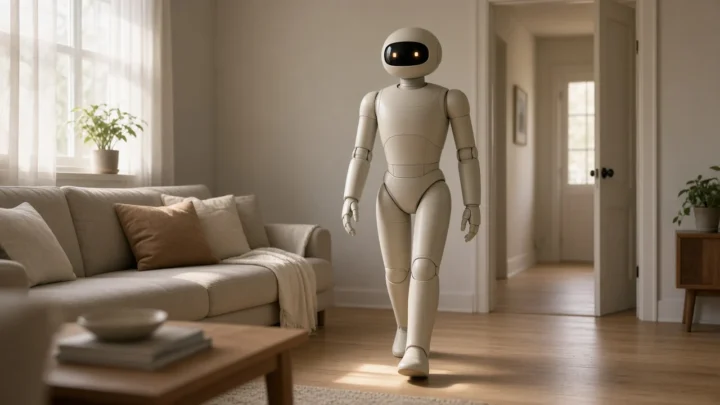
A consumer humanoid robot in a residential setting, illustrating the kind of camera- and microphone-equipped device that benefits from a deliberate privacy audit.
A consumer humanoid moves through every room of your home, making it the most data-aware device most households will ever own.
KEY TAKEAWAYS
  • Camera and audio processing should remain local on-device when possible, depending on the platform.
  • Check what a retention period is for cloud data, and whether it can be shortened.
  • Physical kill switches for the mic and camera are a must. You have to confirm that they actually turn the hardware off, rather than just disabling it in the software.
  • Opt-in rules are needed with third-party data sharing, and a detailed list of who gets what.
  • Run the audit again after major software updates, as defaults change.

Why a humanoid privacy audit matters

For the most part, devices used in the home are stationary and/or do a single thing. An audio speaker or smart display sits on a countertop. A video doorbell looks out of the front door. In contrast, a consumer humanoid goes everywhere, into all rooms, including people’s private spaces, and it’s a convergence of a camera, microphone, environment mapping, cloud AI, and mobile device in one form.

Which is why it’s the most data literate device most homes will ever have. We deliberately audit privacy from delivery and on every major update to ensure device behaviour is in line with what you agreed to buy.

Step 1, Local vs cloud processing

Audit question one is data processing. On-device AI handles the majority of perception and reasoning of modern consumer humanoid robots in 2026, with cloud connectivity supplementing the robot to unlock more advanced capabilities. In the companion app, specify the types of data that are processed locally vs. those that involve data round trips to the cloud (such as camera frames, audio data, and environmental maps).

As far as feasible, prioritize local processing. Although the cloud offers a valuable set of functions it’s not without introducing some additional vulnerability. In short, the benefits of using cloud-based, assisted functions need to be weighed against the data privacy risks inherent in moving that data.

Step 2, Storage and retention

Figure out what the robot keeps: temporary operational info (like the current map or its present job), more enduring individual customization info (like its favorites or voice profile), and any media (such as pictures or audio) that is sent to the cloud for data processing or model training.

Be sure to check how long each of those categories is saved in the cloud. Some services might store uploaded video for only a week or two, while others might do so for several months. Many provide an option to shorten the retention time, or even to turn off the uploads altogether. Make use of these options; they’re often pre-configured to benefit the manufacturer or service, rather than maximize an owner’s privacy.

Data categoryWhere to checkDefault action
Camera framesPrivacy / camera settings in appDisable cloud upload unless required for a feature you use
Audio clipsPrivacy / microphone settings in appDisable cloud upload unless required
Environmental mapMapping / location settings in appKeep local; confirm not shared with third parties
Voice profileVoice / personalization settingsLocal where supported; otherwise minimum retention
Household routinesPersonalization settingsLocal-first; review what is synced for backup

Step 3, Access and sharing

Pinpoint what’s available to who. The owner account is the first party and the manufacturer is another. There may also be cases where certain pieces of data are shared with third parties, like external model providers and integrators, and research programs. Each of these represents an additional consent decision.

Check out the “data sharing” or “partners” sections in the app for any data sharing that you didn’t explicitly want, especially any that involves opting in to be a part of research and analytics. This is one of the ways consent is gained from app owners without their even knowing it, since it’s usually already defaulted to on at the start of the setup process even if the opt-in is there.

Step 4, Physical kill switches

In 2026, most consumer humanoids will have physical microphone and camera disable switches. These are usually a hardware toggle on the chassis of the robot, not something you do via software (which is easy to get around). The mechanical disconnect of power to the sensor is usually what they are referring to when they say ‘disable switch.’ Check the hardware to make sure the camera actually is getting disconnected and not just that there is a software disconnect.

Every household member should know exactly where your kill switches are and how to operate them. The right to privacy at home also includes the right to enforce it. Without a manual, please.

Step 5, Audit after every major update

Your privacy settings are fluid. A software update from your phone’s manufacturer may reset its default, create a new data transfer, or introduce a new feature without you being immediately aware of its privacy impact. Run a short re-audit after each major update, looking for changes in the five categories.

Write down your current settings (put that write down in a text file with your purchase info). Compare your config after every update to the write down you did. If it changes and you didn’t make the change yourself, that’s a red flag.
BEFORE YOU BUY

What to do in your first 30 minutes of ownership

These steps take 30 minutes to perform one-time, and it will protect user's privacy for the platform's entire lifetime.

  1. Navigate to the privacy area of the companion app and make a note of all existing settings.
  2. If the platform allows, you should keep camera and audio processing local only.
  3. Specify the lowest retention period that the platform supports for content held in cloud storage.
  4. Be sure to uncheck data sharing with third parties, research participation, or analytics unless you really want those services enabled.
  5. Verify the mic/cam cutoff switches work as intended, and actually kill power.
  6. Set a calendar alert to run this audit each time you perform a major software update.
TRUST CHECK

Myth vs reality

Myth

Privacy settings stay the same forever once I set them.

Reality

Be aware that a new software update might reset your default settings, incorporate brand-new information pathways, or add fresh features with their own privacy concerns. After the next update rolls out, perform a fresh audit.

Myth

If I trust the manufacturer, I don’t need to check settings.

Reality

Even respectable businesses set defaults for their own purposes, not to maximise your privacy. Defaults are not consent.

Myth

Software microphone toggles are as good as physical kill switches.

Reality

Hardware kill switches sever the power completely; software controls can be circumnavigated by malware, or reset automatically without your knowledge. If you're serious about privacy, you can only rely on a physical switch.

Myth

Cloud-uploaded data is only used to improve my robot.

Reality

Depending on your choices, media files uploaded to the cloud may be used in analytics or model training, or may be shared with business partners, so be sure to check what each category of upload is used for.

Myth

A privacy audit is for paranoid users.

Reality

This is basic housekeeping with any electronic device with a camera and microphone on its person that goes from room to room.

FAQ

Frequently asked questions

Audit basics

How long does a privacy audit actually take? ★
The first time, it takes about thirty minutes. Afterward, you'll only need ten minutes for each significant software upgrade to compare against your documented baseline and identify anything new.
How often should I repeat the audit?
After every major software release, as well as, at least, every 6 months with or without updates. The default can change even within minor releases too.
Where do I find the privacy settings?
Head to your phone’s companion app settings, typically labeled Privacy, Data, or Security, to find the option. Different manufacturers call these areas by different names but the options are similar.

Data and processing

What’s the difference between local and cloud processing?
Local processing means the data is processed directly on the robot; cloud processing is done by uploading it to the robot company’s servers. The first is typically more secure; the second provides more functionality but with higher risks.
What data should I never let the robot upload?
There isn’t a “correct” answer to this question. As a general rule, you should turn off camera frame or audio clip uploads to the cloud unless it’s necessary for something you’re using.
How long does the robot store data?
It depends on what type of data you’re talking about, and who the maker of the equipment is. For example, operational data is typically kept for days, user personalization data is kept for months or longer, and media files that are uploaded to the cloud is kept for however long your data-retention window is set to.

Access and sharing

Who has access to my robot’s data besides me?
More often than not, this will typically be done by the device manufacturer (in accordance with their privacy policy) and any other third parties you have agreed to share with. On some devices, the privacy policy also has optional research or analytical services which will be enabled by default.
Can family members in my household see the data?
That depends on how you set up shared access. Check your account sharing options to see what permissions are given to each user.
What about remote access by support staff?
If you use a device with the ability for diagnostic or service access remotely to vendor's support, verify that it is opt-in by default or available and review any audit logs for past remote sessions.

Kill switches and emergencies

What is a physical kill switch?
A physical button on the robot that physically disconnects the microphone, camera, or both from the power source. In contrast to software-based kill switches, physical kill switches cannot be circumvented by software.
What should I do if I suspect a privacy breach?
You need to turn those physical switches off right away, take screen-shots with the timestamps as proof, and contact the support desk of the manufacturer (as well as your local data-protection authority, if that’s feasible) right away.
Can I delete all my data from the manufacturer’s servers?
Most major platforms feature a complete data export and delete feature, so use it when selling your robot or closing your account.
VERDICT

Bottom line

Carry out a planned privacy check at the time of arrival and following any significant upgrade. Set all defaults to processing locally, minimize data storage, and use opt-out for third-party sharing. Regularly verify that manual overrides work, and ensure every family member is trained on their operation. Keep an updated log of your configuration settings so you can detect even small alterations after updates. Managing privacy within a home with humanoid robots is like any other domestic routine, minor in effort, but huge in worth.