Robot-proofing your home: a practical setup guide for humanoid robots in 2026

Just like we move into homes that already exist, an anthropomorphic robot will inherit a home as it currently exists. Most homes don’t require renovation, but they do need a few small, high-impact upgrades, lighting, cable management and a designated charging station, to make them friendly and functional spaces for a humanoid sharing that space.

RobixOne is an independent editorial site. We do not sell humanoid robots, we do not accept payment for reviews, and every recommendation follows our published HOSI methodology and aggregated owner research. Read our methodology →
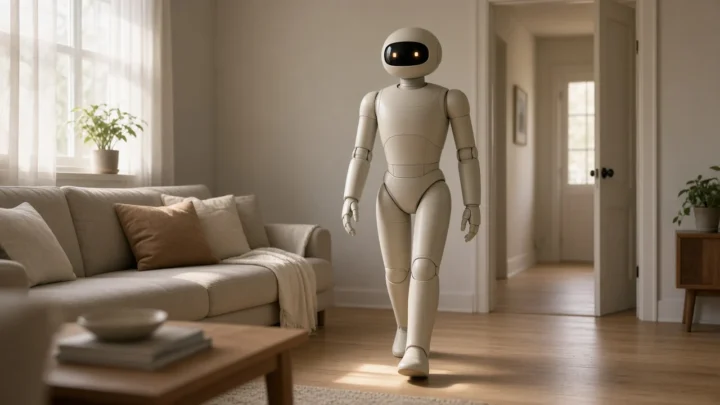
A humanoid robot moving through a real residential home, illustrating the layout, clearance and lighting questions that owners face when robot-proofing.
Most homes don’t need to be redesigned for a humanoid robot, but a handful of small, deliberate changes makes daily use noticeably smoother.
KEY TAKEAWAYS
  • Typically, homes need only a few minor improvements in the areas of clearance, illumination, cable management and a good recharging location, as they certainly don’t need renovations.
  • Ideally, you should plan for 1m clearance between the room on any common robot travel path. Smaller clearances will work, but won’t be as reliable.
  • Lighting is the most underappreciated element: vision-based humanoids see significantly improved results when they operate under stable, even illumination.
  • On the first day, more problems are caused by rugs, thresholds, electrical cords, and off-the-leash toys of the four-legged variety than any other category.
  • To set up your charging dock, make sure to place it in an area with strong wifi reception that is also easily accessible by the robot and is as unobtrusive as possible.

Robot-proofing your home: walking clearance and floor flow

So the first thing a humanoid robot will tell you is where you shouldn’t walk with it. The top complaints on day one tend to be narrow hallways and thresholds that are too tight. The robot often gets into the kitchen and can’t get back out without going forward and turning around. Make sure you give it at least a one-metre passageway between its usual destinations (kitchen to living room, bedroom to bathroom, etc., as well as the place where it charges).

While narrower spaces are usually still passable, they decrease the overall reliability of navigation. Humanoid robots in consumer use can generally pass through a 70cm corridor without issue, though anything less than 60cm usually results in navigational pauses and leads to higher human intervention rates.

Corridor widthRealistic robot experience
≥ 1 metreComfortable for most consumer humanoids; minimal hesitation
70 cm, 1 mWorkable, with occasional path re-planning
60, 70 cmMarginal; expect frequent intervention or alternate routes
< 60 cmAvoid as a primary route; will cause regular failures

Lighting, the most under-rated factor

For consumer humanoid robots in 2026, vision remains paramount; their perception, navigation, and even manipulation performance suffers without sufficient, uniform illumination. Consequently, lighting an active zone, the kitchen, hallway, or robot’s bedroom, would be the most cost-effective yet beneficial improvement many homeowners can make.

Try for even ambient illumination around 300 to 500 lux in working areas. Avoid sharp single-source shadows, as the robot’s vision system handles diffuse, even light far better than dramatic contrast. If you’ve made the decision to install a dim house, LED tape under cabinets and skirting boards are inexpensive, and can improve robot performance significantly.

Cables, rugs, and tripping hazards

Cables crossing walking paths are the single most common reason why real-home robots get lost. Use cable channels or wall-mounted runs or cable covers under rugs or carpets to get cables off of walking paths. You don’t need perfection, you just need to remove the most obvious obstacles to the corridors your robot navigates most often.

Rugs, too, need to be addressed. Thicker pile rugs, those without any kind of backing to keep them in place or rug edges that curl over can all upset your balance. The two simple solutions to most issues related to rugs, non-slip pads underneath rugs and tucking or weighing the edges down, will fix most common rugs issues for a few dollars.

Pet toys and kids’ toys and small loose items lying on the floor, too, raise the frequency of avoidance manoeuvres and the occasional task interruption. Simple end-of-day tidying is more important than most owners may realise.

Choosing a charging dock location

The three considerations to think about in regards to finding a good location to place your charging dock are power, network and access. Power refers to finding a nearby electrical outlet with good access preferably on a dedicated circuit. For higher power requirements check out our 240V EV Charging Hub article for more details. Network means you will want good Wi-Fi availability in the vicinity of the dock. Your robot will spend time in the dock area downloading new software and doing overnight model updates so it is important to have good coverage near the charging dock. Access means you will want a free path of travel from your docking station to your entire house with the best option being near the center of the primary working area of your robot.

The dock shouldn’t be put in narrow corridors, behind doors, busy entry points, or in an area that has rapid temperature shifts, like near a southern window in direct sunlight. Some of the most successful installations we’ve seen in the real world are quietly tucked away in a corner in a hallway, at the edge of an outbuildings/utility room or in a niche space carved specifically for the product.

Fragile, valuable, and irreplaceable items

While humanoids of 2026 would certainly be far more careful around breakables than most industrial platforms, they’d still be anything but zero-risk for breakables. The proper response here is not to panic or to remove them from the environment; it’s just to get rid of breakables or store them elsewhere in areas of high human-robot interaction where the stakes outweigh the risks.

Items worth reconsidering are primarily display shelves at robot-height with valuable ceramics, glass-front cabinets with poor latches, and decorative items balanced on shallow surfaces. These can be put on higher shelves, held in place with museum putty, or moved outside the robot’s reach.

Acoustic environment

Acoustic conditions play a big role in how effective voice interaction will be. Echoes in the room, for example from hard surfaces, a large open area or high ceiling, will interfere with the robot’s ability to understand speech. You don’t need to go as far as soundproofing, but soft furnishings, rugs, curtains and sound-absorbing tiles will help improve voice performance. A kitchen with even a single rug and some curtained windows will have better voice performance than that same kitchen with no soft surfaces.

BEFORE YOU BUY

What to actually do before delivery day

The following are easy actions you can take in one or two days to make your first few weeks with your new robot feel much easier.

  1. Traverse the primary routes the robot will follow and verify a minimum clearance of 1 metre is available on the main passageways.
  2. Check the lighting in the kitchen, hallway, and main working areas, and use some cheap LED strips or swap out light bulbs to address uneven lighting levels.
  3. Group and route the cables from the floor following the typical routes of the robot; apply cable covers on areas where cables must cross.
  4. Verify or attach non-slip backing to all rugs within the robot zone and secure loose or rolled edges.
  5. Select the charging dock area for power stability, Wi-Fi signal strength, and easy access, and test the Wi-Fi signal at the location before delivery.
  6. Place items that are irreplaceable or fragile in places the robot will not be working in regularly or use putty or museum-grade closed cabinets to secure them.
TRUST CHECK

Myth vs reality

Myth

I need to renovate my home to use a humanoid robot.

Reality

Typically, all you're going to need for a home is a couple of hundred dollars' worth of lighting fixtures, cable management and clearance modifications. You'll almost never need a major renovation.

Myth

More light is always better.

Reality

Diffuse light, even at a lower intensity, is preferable to an overbearing luminescence. Excessively strong direct light, or extreme contrast, can impair vision-based perception more than a moderately subdued ambient setting.

Myth

If a robot can walk in a demo, it’ll walk through anything.

Reality

They do tune demo environments for performance. Real homes have rugs, and cables, and thresholds, and unexpected obstacles.

Myth

Charging dock location doesn’t matter much.

Reality

It’s perhaps the most critical choice you can make at the dock. A weak Wi-Fi connection at your home will cause updates to fail, erase all of your settings, and require you to step in manually.

Myth

Robot-proofing is a one-time setup task.

Reality

Plan on making minor corrections during those first four to six weeks as your robot learns where the dirtiest areas of your house are.

FAQ

Frequently asked questions

Clearance and layout

How much clearance does a consumer humanoid actually need? ★
The main paths between rooms must have a clearance of at least 1 m to maintain high reliability. Shorter paths are acceptable, although they will compromise reliability, and paths of 60 cm or less should be avoided.
What about stairs?
Stair capability differs significantly across platforms. Certain consumer bipeds are proven to reliably climb typical house stairs; others may be better kept to one story at a time. Check your particular platform's stair performance before relying on it for multi-story movement.
Do thresholds and door sills cause problems?
Low thresholds are generally not an issue (i.e., 1.5 cm or lower). But you might encounter difficulties if the threshold is higher than that. If a certain threshold is problematic, you can often solve it with the addition of a low ramp or transition strip.
What if my home has a lot of corners and tight turns?
Tight corners can slow a robot down, but they rarely pose major problems. A quick re-arrangement of furniture to create open access to high-traffic corners will quickly show a return on the investment.

Lighting and surfaces

How much light do I actually need?
A range of 300 to 500 lux is a practical sweet spot in workspaces. In fact, uniform light is far more important than luminous intensity.
Does the colour of the light matter?
Not much so. Warm-only lighting, specifically under 3000k, can sometimes cause issues with color-object detection. A combination of warm and neutral is typically ideal.
What surfaces does a humanoid struggle with?
The floors can be extremely glossy, polished marble, and mirror-finish wood floors, and this can also cause vision systems to become confused. Thick carpeted flooring, flooring wet with water, and flooring that is very black and non-reflective will also diminish reliability.

Hazards and obstacles

What about cables on the floor?
The leading culprit in navigation failures is the cable striding over walkways. Avoid this by running cables up through channels and along walls, then place the cable under the rug.
Do I need to put pets in another room?
Not typically. The majority of consumer-grade humanoids are able to interact with dogs and cats safely after just an introductory visit. If your pet is nervous, the simplest solution is to keep them in another room the first week.
What about children’s toys on the floor?
Loose toys can trigger occasional little navigation glitches. A routine end-of-day tidy, especially in the places the robot uses the most, helps.

Charging and connectivity

Where should I put the charging dock?
Find a relatively quiet, easily accessible location. This should have reliable wireless connectivity and a nearby power outlet. Avoid hallways and doorways or any area with extreme temperature fluctuations.
How important is Wi-Fi quality at the dock?
Critical point: Most platforms leverage the overnight docked time for both software updates and model refresh. If a robot's Wi-Fi connection is not strong enough, it will fail to receive those overnight updates, causing it to run on an earlier, less-capable model.
Can I move the dock later?
You're probably right to anticipate that the robot will remap and reorient over the next 24-48 hours, once you move it. However, don't move the dock unless the new location is unequivocally better.
VERDICT

Bottom line

Treat the weekend ahead of delivery as a four-pronged mission to future-proof your house against the bot: tidy those clearances, upgrade your lighting, tuck away your cables, and find an ideal spot for the docking station. Leave the construction work for another day. Your first several weeks with a robot is likely to be spent adjusting to your specific house and the robot itself shows you which corners of your home need a second look. The right preparation won't make the machine wiser, but it can save you from a month of aggravation.